
BitLocker Locked Drive? What It Means and What You Can (and Cannot) Do
One of the most confusing situations laptop owners face is connecting a hard drive or SSD to another computer and suddenly seeing a message asking for a BitLocker recovery key. This often happens after a Windows crash, blue screen error, motherboard failure, or when the drive is removed and connected externally.
At MT Systems, this is a very common case we handle — especially for business laptops like HP EliteBook, Dell Latitude, Lenovo ThinkPad, and Microsoft Surface devices.
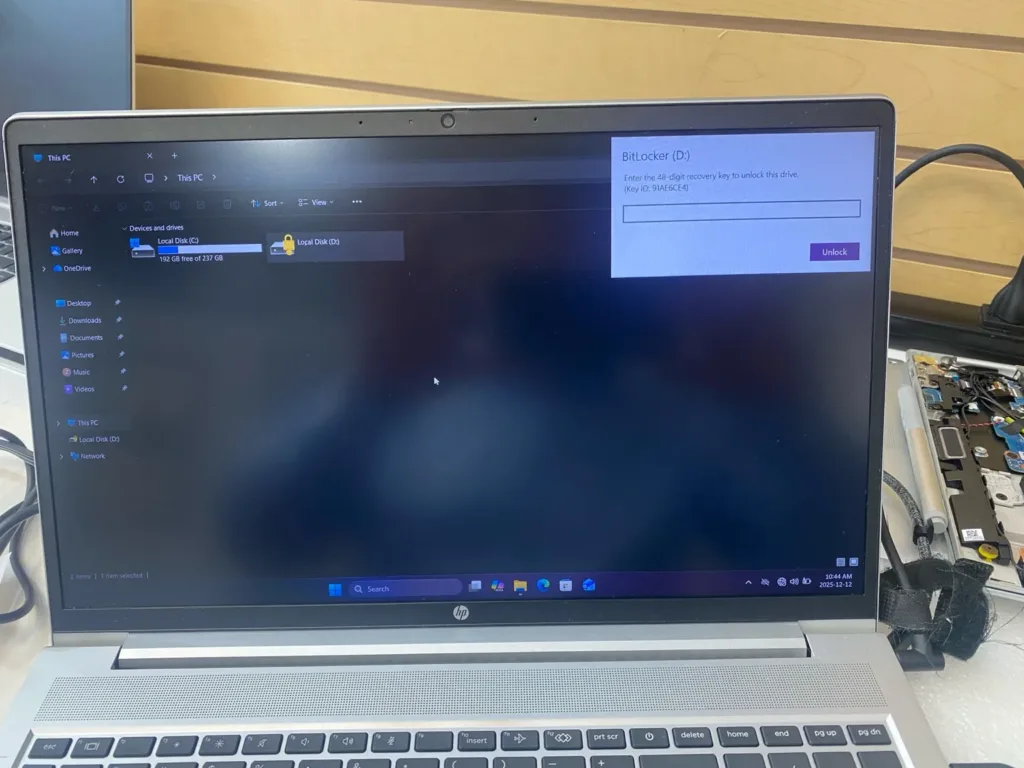
What Is BitLocker and Why Is the Drive Locked?
BitLocker is Microsoft’s built-in encryption system designed to protect data if a laptop is lost or stolen. When BitLocker is enabled:
- The entire drive is fully encrypted
- The data is unreadable without authorization
- Windows will ask for a 48-digit recovery key if it detects a security change
Common triggers include:
- Removing the SSD from the original laptop
- Connecting the drive via a USB or SATA adapter
- Motherboard replacement
- BIOS or TPM changes
- Windows corruption or blue screen errors
This is normal behavior, not a virus or hardware fault.
Can Data Be Recovered Without the BitLocker Key?
This is the most important question customers ask — and the answer must be honest:
➡ Without the BitLocker recovery key, encrypted data cannot be decrypted.
There is:
- No software
- No data recovery tool
- No professional workaround
that can bypass BitLocker encryption without the correct key.
This is exactly how BitLocker is designed — for maximum security.
Where the BitLocker Recovery Key Might Be Stored
Before assuming the data is lost, we always help customers check the most common places where the recovery key may exist:
- Microsoft account used on the laptop
- Work or school IT account
- Printed or saved recovery key file
- USB flash drive used during setup
- Company or organization IT department
Many customers eventually find their key once they know where to look.
What MT Systems Can Do in BitLocker Cases
Even when data cannot be unlocked, MT Systems still helps in several critical ways:
- Confirm whether the drive is BitLocker-encrypted
- Check if the drive hardware is still healthy
- Advise on recovery key lookup
- Safely wipe and reuse the drive if data recovery is impossible
- Install a fresh Windows operating system
- Help customers migrate to a new or refurbished laptop
If replacement is the best option, customers can explore our professionally tested refurbished laptops with warranty:
👉 https://mt.allthewayupmedia.com/product-category/laptops/
Why This Often Happens After a Laptop Failure
We commonly see BitLocker cases after:
- Blue screen crashes
- Dead motherboards
- Liquid damage
- Power failures
- SSD removals for data backup attempts
In many cases, customers did not even realize BitLocker was enabled — it is often automatically activated on modern Windows laptops.
Professional Advice Before Removing a Drive
If your laptop stops working:
- Do not remove the SSD immediately
- Do not repeatedly power it on
- Do not attempt random recovery software
Bring it to a professional repair shop first. In some cases, data can still be accessed before BitLocker locks the drive externally.
Trusted Data & Laptop Services Since 2007
At MT Systems, we have been handling Windows security, data recovery, laptop repair, and system failures since 2007, serving customers across:
- Toronto
- Thornhill
- Richmond Hill
- GTA
- Canada-wide
We specialize in:
- Laptop repair
- MacBook repair
- Desktop & iMac repair
- Microsoft Surface repair
- SSD & data services
- Windows & macOS troubleshooting
- Refurbished laptops & computers
Need Help With a BitLocker-Locked Drive?
If you’re facing a BitLocker recovery screen and don’t know what to do next, we can guide you properly — even if recovery isn’t possible.
📍 MT Systems
7378 Yonge Street, Unit 3B
Thornhill, Ontario, L4J 8J1
📞 905-482-3365
🌐 https://www.mtsystems.ca
👉 Contact us here: https://mt.allthewayupmedia.com/contact/