
Lenovo Laptop SSD Upgrade, Windows Installation & Fan Deep Cleaning – Completed for a Toronto / Thornhill Customer
Today at MT Systems, we worked on a Lenovo laptop brought in by a customer from Toronto and Thornhill, Ontario who was experiencing slow performance, long boot times, and constant freezing. The system’s original storage was failing, causing Windows issues and making the laptop almost unusable.
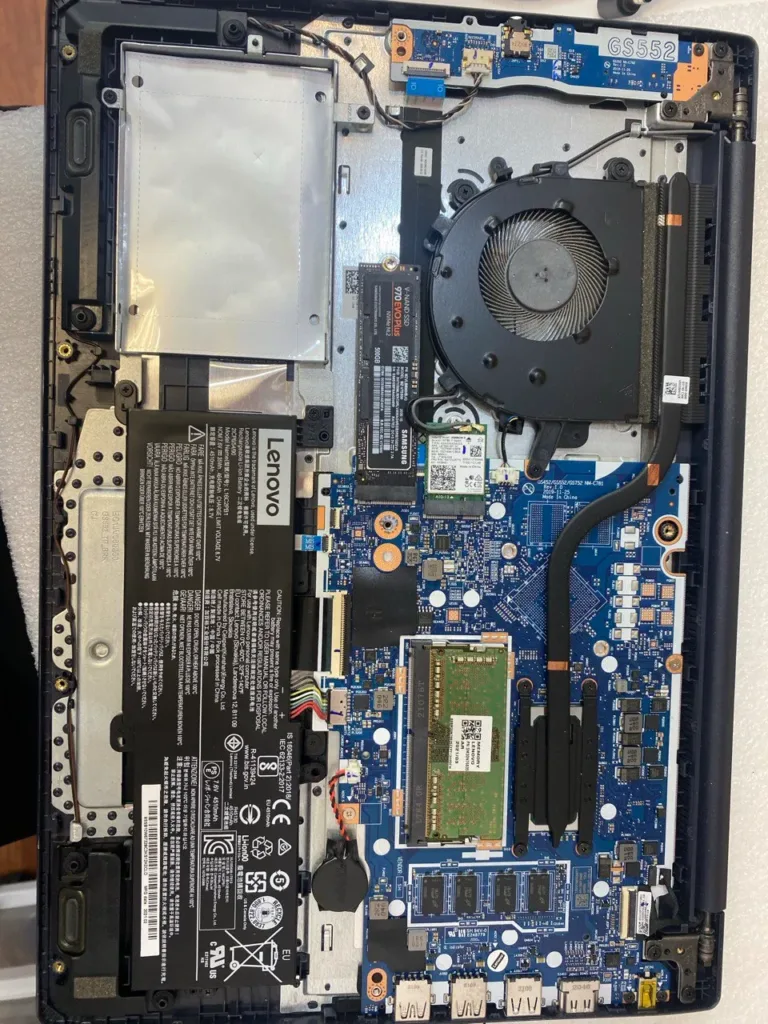
After running diagnostics, we recommended upgrading the storage to a brand-new Samsung 500GB NVMe SSD, one of the fastest and most reliable drives available. Once the SSD was installed, the difference in speed was immediate. This upgrade alone transformed the laptop into a completely different machine — faster boot-ups, quicker file access, and smooth multitasking.

Before
Since the system had severe software corruption, we proceeded with a fresh Windows installation, fully updated and optimized. We installed all required Lenovo drivers to ensure the laptop performed exactly the way it should. The customer received their laptop with a clean, stable, and modern operating system running on top-tier storage hardware.
While working inside the computer, we noticed the CPU fan was completely clogged with dust, restricting airflow and causing the processor to run hotter than normal. Dust buildup not only slows down a laptop — it can also shorten the life of the motherboard. Since we already had the system open, we performed a full internal fan cleaning to restore proper cooling. After cleaning, the airflow improved dramatically, and the laptop now runs cooler, quieter, and more efficiently.
After
This type of service is something we perform every day at MT Systems, and customers trust us because we combine hardware expertise with attention to small details. Whether it’s a failing hard drive, a laptop running slow, or a dusty fan that needs deep cleaning, we always make sure every machine leaves our shop working better than when it arrived.
Upgrading to a Samsung NVMe SSD, installing a fresh copy of Windows, and performing a proper internal cleaning is the best way to bring an aging laptop back to life — and it’s exactly what we delivered for this Lenovo system. The customer left with a device that feels faster than new, reliable, and ready for heavy use again.

If you’re experiencing slow performance, Windows crashes, or storage problems, or if your laptop feels hot or noisy, MT Systems is the place to visit. We’re known across Thornhill, Toronto, and the GTA for our high-quality work, fair pricing, and reliable computer repair services.